⚠️ Important Notice: This article applies to the Legacy Management Dashboard. If you are using the New Management Dashboard, the corresponding article can be found here: Assign Roles_New.
This article describes how to create an Admin.
System Administrators: Manage > Admin Dashboard > Users > (Search for desired user) > Edit
RideAmigos supports an unlimited number of top-level system administrators, and existing administrators can easily add or remove admin privileges for other users.
While editing a user’s information, select the “Is Admin User?” option.
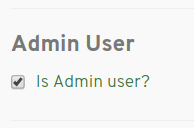
Upon saving, this will immediately grant administrative abilities.
Things to Consider
- Make sure any users you elevate to administrator status are wholly trustworthy.
- Site administrators all have equal, all-powerful abilities. With great power comes great responsibility.
- Once someone is an administrator they can then make other users administrators, too.
- Administrators are able to view all information related to users, saved trips, triplogs, etc.
- Your organization may want to create formal policies specific to persons who are site administrators.
- Don’t default to making people administrators if Network Manager privileges will do.
In general, we recommend using Network Managers whenever possible in order to provide the highest level of protection to your system and user data. Reserve administrator accounts for those who truly need system-wide access.
Learn more about the privileges and abilities of Managers and Administrators.